Why Your QR Code Isn't Scanning (And How to Fix It): The Complete Troubleshooting Guide
QR code not scanning? Here's every reason it fails and how to fix it - from size and contrast to expired dynamic codes and damaged prints.
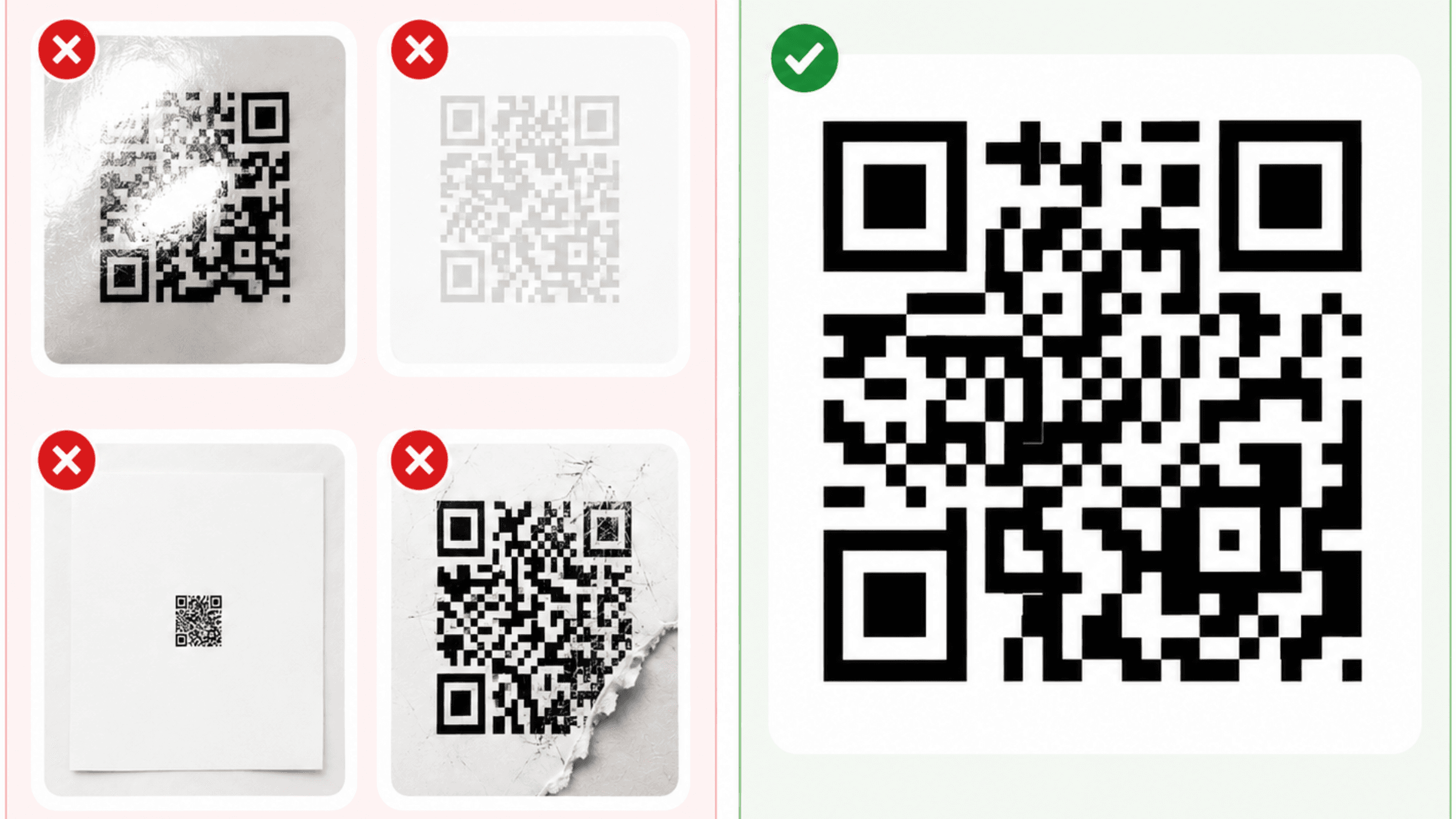
The framing that helps: every QR code is a contract between three parties. The printed code (or displayed code), the phone trying to scan it, and the server the URL eventually points at. A scan fails when any one of those three parties breaks the contract.
This guide is organised by which party is the culprit. Most issues are with the code itself, so we start there.
The fast diagnostic: figure out who's at fault in 30 seconds
Before troubleshooting in depth, run this test:
- Try a known-good code. Open any other dynamic QR you've tested before and scan it. If that scans, your phone is fine.
- Try the problem code on a different phone. Borrow someone else's. If their phone scans it, your phone has the issue. If neither phone scans it, the code is the issue.
- Try the problem code in better light. Take it to a window or bright lamp. If it scans now, your problem is lighting or contrast.
- Read the URL manually if it's printed next to the code. Type it into a browser. If the page loads, the destination is fine and the code itself is broken. If the page fails, the destination is broken and the code is innocent.
Whichever step revealed the culprit, jump to that section below.
Problem 1: The code is physically damaged
QR codes have built-in error correction. Up to about 30% of the pattern can be obscured or damaged and the code will still scan. But "30%" is the maximum at the highest error correction level - many real-world codes are generated with lower error correction and tolerate much less damage.
What damage looks like:
- Folds or creases through the code
- Coffee stains, water rings, food smears
- Scratches that have removed ink
- Fading from sun exposure
- Stickers or labels covering part of the code
- Print defects (banding, misalignment, smearing)
The fix:
- For minor damage (less than 10% obscured), most modern phone cameras still read the code. Try scanning from different angles or distances.
- For significant damage, you need a fresh print. If the underlying code is dynamic, no problem - print a new copy. If the code is static, the URL is encoded directly in the pattern, so a fresh print of the same code will work.
The prevention: print codes on durable materials for any high-traffic location. Lamination, acrylic standees, and weatherproof vinyl all add years to a code's working life. For outdoor codes, UV-resistant ink is worth the extra cost.
Problem 2: The code is printed too small
A QR code needs to be big enough for the camera to resolve the individual modules (the small black squares that make up the data pattern).
The general rule:
Minimum size = scan distance ÷ 10
A code scanned from 30cm away (arm's length) needs to be at least 3cm. A code scanned from 3 metres (a poster on the wall) needs to be at least 30cm.
In practice, the minimums for common scenarios:
- Business cards / table standees: 2.5-3cm minimum
- Magazine ads / flyers: 3-4cm
- Storefront windows: 5-8cm
- Posters at indoor distance: 10-15cm
- Large posters viewed across a room: 20-30cm
- Billboards: depends on viewing distance; can be over a metre
The fix: if your code is borderline-small, reprint it bigger. If you've already printed at volume, the only practical fix is to bring the printed material closer to the user - but that's usually not feasible.
The prevention: measure twice, print once. Always test the actual printed size in the actual environment before printing at volume.
Problem 3: Contrast is too low
QR codes scan most reliably when the dark squares are very dark and the light squares are very light. The contrast ratio between them needs to be high.
Common contrast failures:
- Mid-tone grey code on a white background
- Dark code on a dark-coloured background
- Coloured codes (especially pastels) without sufficient contrast
- White codes on a black background (works on most modern phones, fails on older Androids)
- Codes with semi-transparent overlays
- Codes printed on textured or coloured paper where the colour bleeds into the modules
The fix:
- Reprint with higher contrast. Black on white is the safest.
- If you need a coloured code for branding, use a very dark colour (deep navy, forest green, burgundy) on a very light background.
- If the code is on a coloured surface, add a white panel around the code itself.
The prevention: test the actual printed code on the actual paper or surface in the actual lighting. A code that looks beautiful in the design comp on a designer's calibrated monitor often fails in a dimly-lit restaurant.
Problem 4: Glare or reflection
Glossy paper, laminate, plastic packaging, and shiny acrylic standees all reflect light. If the reflection hits the camera lens, the camera can't see the code clearly.
The fix:
- Tilt the phone 15-20° off-axis. This breaks the reflection without changing the camera's ability to read the code.
- Move so the light source is behind you, not behind the code.
- For codes on glossy surfaces, dim overhead lights if you can.
The prevention: avoid high-gloss finishes for QR codes in high-light environments. Matte or satin finishes are more forgiving.
Problem 5: The destination URL is broken
The QR code might scan perfectly, but the URL it points at returns a 404 (or a "this site can't be reached" error), so the user thinks the code failed.
How this happens:
- The destination page was moved or deleted.
- The URL was typed wrong when the code was generated.
- The site is temporarily down.
- The URL had a typo or extra space.
- The URL contains characters that needed encoding.
The fix:
- If the code is dynamic: log into your QR provider, change the destination URL, and the same code now points at the new URL. No reprinting. This is the dynamic code superpower.
- If the code is static: the URL is baked into the code. You can't change it. Your only options are reprinting with the correct URL, or setting up a redirect at the original URL on your own server.
The prevention: always test the destination URL the moment the code is generated and again after the page goes live. Update routinely if your site structure changes.
Problem 6: The dynamic code has expired or been disabled
This is the most painful failure mode, because the code itself is fine - it's just that the provider's server isn't redirecting any more.
Common causes:
- Your free trial with the QR provider ended.
- You cancelled or downgraded your subscription, and the provider's policy is to disable dynamic codes on cancellation.
- Your account was suspended for non-payment.
- The provider went out of business.
- The provider deleted the code due to inactivity (rare but happens).
The fix:
- Log into your QR provider account. If the code is paused or disabled, reactivate it (which usually means resubscribing).
- If the provider has shut down or your account is gone, you'll need to generate new codes on a new platform and reprint.
The prevention: this is the single most important reason to choose a QR provider whose codes don't break on cancellation. QR Cake's policy is that codes keep working at their last-saved destination even after cancellation. Most paid providers disable codes when subscriptions end. Read the fine print before betting your printed assets on a provider.
Problem 7: Phone camera issues
Less common than people assume, but it happens.
Common phone-side issues:
- Lens is smudged. Wipe it with a microfibre cloth. This fixes more "broken" QR codes than any other intervention.
- Camera app is the wrong one. Some Android manufacturers have multiple camera apps. Make sure you're using the standard one with QR support enabled.
- QR scanning is disabled in camera settings. Some Samsungs and Xiaomis hide this in Settings → Camera → Scan QR codes.
- Camera is in a mode that doesn't scan. Selfie mode doesn't scan reliably; some "professional" modes don't either. Use standard photo mode.
- Operating system is too old. iOS before 11 and Android before 8 don't have built-in QR scanning.
The fix: try the problem code on a different phone, or install a reliable third-party scanner app (TeaCapps QR & Barcode Scanner on Android; the iPhone Camera app or Code Scanner from Control Centre on iOS).
Problem 8: Code is too dense
This is a producer-side failure that's easy to miss. The more data you encode in a static QR code, the denser the pattern gets. A short URL produces a sparse, easy-to-scan code. A long URL with UTM parameters produces a dense, fragile code.
The fix:
- For static codes, shorten the URL before generating the code. Use a URL shortener or move UTM tracking to the server side.
- Better: switch to a dynamic code. Dynamic codes always encode a short redirect URL, so the pattern is sparse and forgiving even at small sizes. A free QR Cake dynamic code is a quick way to test whether density was the problem - regenerate the same destination as a dynamic code and compare the two side by side.
The prevention: never put long URLs into static QR codes if the code will be printed small. Test the resulting code at the planned print size before committing.
Problem 9: Bad placement
Even a perfectly-generated, perfectly-printed code can fail because of where it sits.
Common placement failures:
- Behind glass that reflects (museum displays, framed posters)
- On a surface that's curved (cylindrical packaging, drink cans)
- On fabric or knitted material that distorts the pattern
- In a position where light only reaches one side
- Where users approach from an angle that distorts the code in their camera
The fix: move the code to a flat, well-lit, accessible position. Always test the actual placement before printing at volume.
The prevention: treat placement as part of the design, not an afterthought.
Problem 10: Inverted colours
QR codes are designed to be read as "dark modules on a light background." Inverted codes - light modules on a dark background - work on modern iPhones and recent Androids, but older devices often fail.
The fix: print the code with dark squares on a light background. Even if your design comp shows the opposite, the production version should be conventional.
The prevention: if you need a light-on-dark aesthetic for design reasons, test extensively with older Android phones before committing. Many older Androids (especially budget models) genuinely cannot read inverted codes.
How to test your code before printing at volume
Before you commit to printing 1,000 of anything, run this 10-minute test:
- Print one code at the actual planned size.
- Scan with an iPhone (Camera app).
- Scan with an Android phone (Camera app or Google Lens).
- Scan from the closest distance someone might approach.
- Scan from the furthest distance someone might approach.
- Move to the dimmest part of the room where the code might live and scan there.
- Test on at least one phone running an older OS (iOS 14 or Android 9 if possible).
- Open the destination URL and confirm it loads in under 3 seconds on mobile.
If any step fails, fix it before printing in volume.
Frequently asked questions
Why does my QR code scan on one phone but not another? Usually one of three things: the working phone has better camera optics, better software-side QR detection (newer OS), or you're holding it at a different distance/angle. Try the failing phone with the suggestions in the camera section above.
My QR code worked yesterday and doesn't work today. Why? Three likely causes, in order: (1) the destination URL has changed or returned an error, (2) the dynamic code's subscription has ended, (3) the code has been physically damaged.
Can I fix a static QR code without reprinting? You can't change the code itself - the URL is baked in. But if you control the destination URL's domain, you can set up a server-side redirect from the original URL to a new one. This keeps the printed code working.
Why do some QR codes scan instantly and others take a few seconds? The fast-scanning ones have higher contrast, better print quality, optimal size, and sparse data patterns (usually short URLs). The slow ones have one or more weaknesses that the phone has to work harder to overcome.
Does the error correction level affect scanning? Yes. Higher error correction (L, M, Q, H - H being the highest) makes codes more tolerant of damage but also denser. Most generators default to M (medium), which works for most use cases. For outdoor or industrial use, switch to Q or H.
Will iPhones scan QR codes that older Androids can't? Often yes. iPhones generally have better QR detection than mid-range and older Androids. If you're producing codes for the public, optimise for the weakest reasonable phone in your audience, which usually means an older Android.
Are coloured QR codes less reliable? Not inherently. The reliability is about contrast, not colour. A black code and a dark navy code work equally well on a white background. A pastel-yellow code on a white background works poorly. Test before committing.
Why does my code work in daylight but fail under restaurant lighting? Light levels affect the camera's ability to focus and the perceived contrast of the code. In dim light, the camera takes longer to focus and may see less contrast than it would in daylight. Bigger code, higher contrast, more reflective-friendly surface = better dim-light performance.
When in doubt
If you've worked through this guide and your code still isn't scanning, the issue is almost certainly one of:
- Code generated with broken parameters (rare but happens - try regenerating)
- Provider-side outage (check your provider's status page)
- Destination server is down or blocking your traffic
If none of those apply, the code may have a subtle production defect. The fastest fix is to regenerate the code from a known-good provider and reprint.
Create a fresh dynamic QR code
Ready to make your own QR code?
Create a dynamic QR code you can edit after printing. Free to start, no card required, unlimited scans, and your codes never expire.

About the QR Cake team
Written by the QR Cake team - the people building QR Cake, a dynamic QR code platform used for editable print campaigns, Canva QR codes, scan analytics, and long-lived QR redirects that keep working after subscriptions end.
Learn more about QR CakeFrequently asked questions
- Why does my QR code scan on one phone but not another?
- Usually because the working phone has better camera optics, newer software-side QR detection, or you're holding it at a different distance or angle.
- My QR code worked yesterday and doesn't work today. Why?
- Three likely causes, in order: the destination URL has changed or returned an error; the dynamic code's subscription has ended; the code has been physically damaged.
- Can I fix a static QR code without reprinting?
- You can't change the code itself - the URL is baked in. But if you control the destination URL's domain, you can set up a server-side redirect to a new URL, which keeps the printed code working.
- Does error correction level affect scanning?
- Yes. Higher error correction makes codes more tolerant of damage but denser. Most generators default to medium, which works for typical use. For outdoor or industrial use, switch to high error correction.
- Are coloured QR codes less reliable?
- Not inherently. The reliability is about contrast, not colour. A black code and a dark navy code work equally well on white. A pastel code on white works poorly.
- Why does my code work in daylight but fail under restaurant lighting?
- Lower light levels reduce camera focus quality and perceived contrast. For dim environments, print bigger codes with higher contrast on less-reflective surfaces.
Related Articles
Keep reading practical QR code guides, examples, and optimization tips.
QR Codes on Product Packaging: The 2026 Guide (Use Cases, Regulations, and Pitfalls)
Most major CPG brands now ship products with QR codes. The interesting question is no longer whether to use a code, but what for - and most teams underperform here.
How to Create a Google Review QR Code (Step-by-Step, 2026)
Google reviews drive local search rankings, trust, and conversion. A QR code that takes customers directly to your review form removes the single biggest barrier to actually leaving one.
Business Card QR Code Guide: Size, Placement, and What to Link To (2026)
A QR code on a business card is the single highest-ROI use of QR on print. The card lasts as long as the design; the destination updates with your career.